

23.4. Import KML/KMZ |
This command performs the opposite step to that of Export Entities to Google Earth, draws the contents of a Google Earth KML or KMZ file in the CAD. First, a window appears in which you specify the coordinate system of the drawing. By default, the SRC will be automatically populated in the event that the drawing has one assigned.
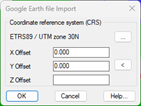
Then the program requests the file with KML or KMZ extension to import, then the following window will appear in which we have the possibility to select the layers to import:
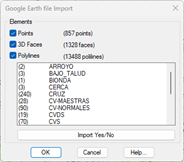
Recognized elements: This command has the possibility to import "Points", "3D Faces" and "Polylines", designated the file will show us the number of existing entities of each of them with the possibility of activating or deactivating the import.
Additionally, in the list we see all the existing layers in the selected file so that the user can select the layer he wants to import.
Once the dialog is validated, the selected entities will be automatically imported.
|
|