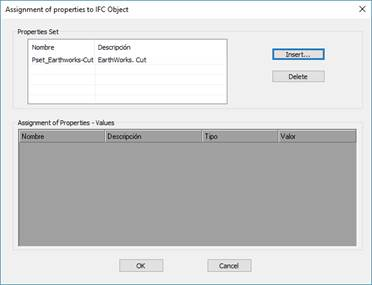
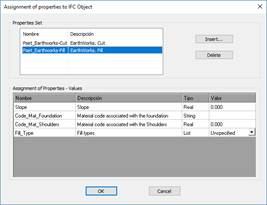
In this command we assign the sets of properties to each of the MDT elements.
When executing the command initially it does not request the MDT file (Horizontal alignment, Surfaces, etc.) to which the properties will be associated, once selected, the following window will appear in which the assignment will be made.
Insert: We select one of the available Properties Sets to assign it to the selected MDT element.
Once assigned, if we section it, the properties of it will appear with the possibility of assigning a specific value to each of them.
Delete: The selected Set of Properties is deleted.
Additionally MDT, in the process of exporting to IFC each of the elements (Alignments, Surfaces ...), associates some properties to each of them automatically. There are some properties common to all the elements and others specific to each of them.
To do this, see the final appendix IFC Properties – MDT Objects.

 TcpMDT - Help