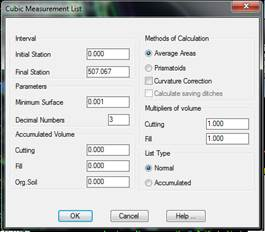
This command generates a complete list of the surface areas and volumes in a segment. It displays the cutting, fill and organic soil surface areas and volumes by station, as well as their accumulated values.
MDT initially requests the segment file containing all the project’s information (see Definition of Segment in the Alignments section), in other words, information on the grade line, the natural terrain, cross-section template, etc. Once it is selected, the following dialog box is displayed where the parameters of the list one wishes to obtain are set.
The user has the option of selecting several segments simultaneously, whereby the cubic measurement will be calculated for each of the segments in an independent list. This avoids the execution of the command once for each of the segments we need to calculate.
The dialog box’s characteristics and functionalities are described below.
Initial Station: Station from which the volume measurement will be calculated.
Final Station. Station up to which the volume measurement will be calculated.
Minimum Surface: Sets the minimum surface area admissible on the list. Any values that are lower are considered as zero. It is used to prevent accuracy or rounding off errors that could lead to confusing results.
Number of Decimals: Sets the number of decimals with which one wishes the volume measurement calculations to be displayed.

 TcpMDT