

19.19. List Buildings |
This shows a list with the information of all existing buildings in the drawing, as well as showing the attributes that can be seen when editing buildings. The plot to which each of the buildings belongs is also shown.
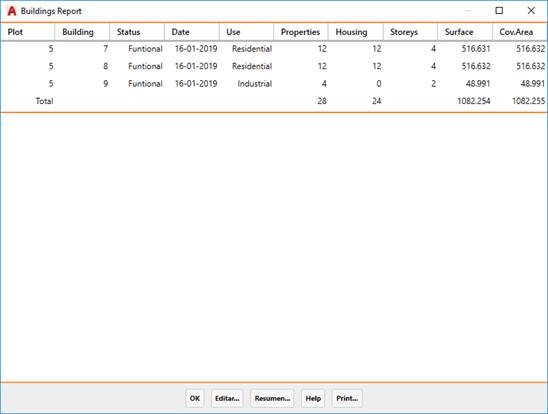
Edit: Editing the selected building, with the option to modify any of its parameters.
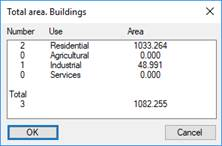
Summary: This shows a window with the total number of buildings according to their use and the total area of each.
|
Dimension Building
|
This command dimensions the selected buildings, drawing informative texts on them. Upon request for these objects, the following dialog is displayed:
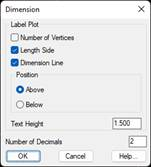
Number of Vertices. Its number relative to the polyline is labeled near the vertex, starting at 1.
Length Side. The length of each side is labeled with the position and height of the text specified in the following controls.
Dimension Line. If this option is enabled, a line is drawn on the dimension layer on each side of the plot.
Position. Indicates if the lengths of the sides are to be labeled Above or Below the line that defining these sides.
Text Height. Specifies the height of the texts to be drawn by this command, for both vertex numbers and side lengths, in drawing units.
Number of Decimals. Specifies the number of decimal places to be used to label the side lengths.
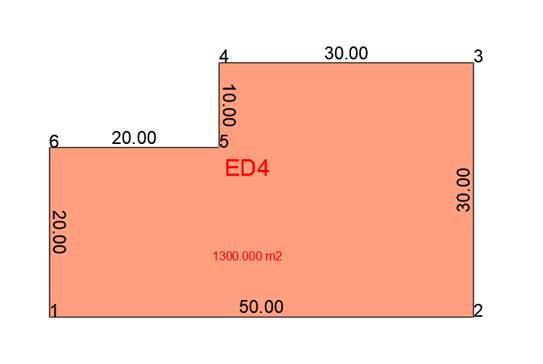
After specifying the parameters in this dialog, the selected buildings will be dimensioned.
|
|