

19.20. Create Building Island |
This tool allows us to define interior contours to the building type plots so that they would be part of the propertyor building. In the calculations of areas of the building, the area of each of the islands that has defined within its perimeter will be automatically discounted.
For its definition, the command requests a polyline and when you select it automatically converts it to a building island. This type of element will draw it according to the parameters set in configuration.
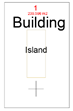
In the next capture we have a building with the name "1" and which contains an inner courtyard which is represented by an island.
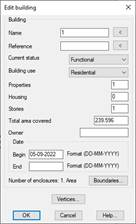
If we edit the building, in the editing window you can see the islands contained in the building, as well as the total area associated with them.
|
|