

23.7. Center Google Earth |
This command allows you to open Google Earth and make it "fly" to the area of the earth that your drawing represents. You can also select a specific window. The projection will appear by default, if the drawing has it assigned.
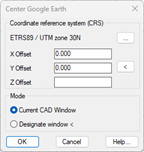
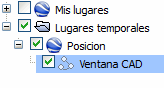
To the Accept, Google Earth will open and move to the selected area, which will be framed with a polyline referenced as CAD Window in the list of places. By unchecking the corresponding box, the polyline can be hidden.
|
|