To properly display this page you need a browser with JavaScript support.
TcpGPS Windows
×
Menu Tab
Index Tab
Search Tab
Search Tab
Search Tab
5. File Management
5.3. Points
Previous page
Next page
(c) Company name, 2019
To properly display this page you need a browser with JavaScript support.
5.3. Points
All of the current project’s surveying points are stored in these files in ASCII format. These files have the *.
PUN
extension (compatible with
TcpMDT)
and contain the following data for each point:
<Number> <X Coordinate> <Y Coordinate> <Z Coordinate> <Code>
A point file is automatically created whenever a project is created. It has the same name as the project and has the aforementioned extension.
The program allows for repeated points, as well as points having alphanumeric numbering. Their names cannot contain spaces.
The field separator can be a space, a tab or a comma.
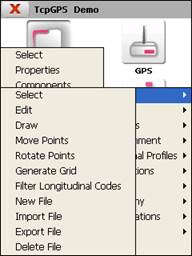
The options available to manage this kind of files are the following:
The contents of:5.3. Points
5.3.1. Select
5.3.2. Edit
5.3.3. Draw
5.3.4. Move Points
5.3.5. Rotate Points
5.3.6. Generate Grid
5.3.7. New File
5.3.8. Import File
5.3.9. Export File
5.3.10. Delete File