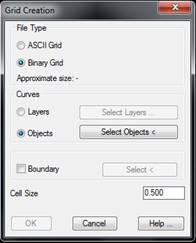
This tool allows one to create a grid file from a set of contour lines.
The type of grid to be created is specified in File Type: either ASCII Grid or Binary Grid. When one or other option is selected, the approximate size of the file to be created is displayed.
The possibility of specifying a Boundary exists by designating a closed polyline with the Select button. In this way, the grid would then be defined only within the boundary polyline. This check makes the grid creation process slower, and it is therefore not advisable for very dense grids.
Lastly, the Cell Size parameter determines the separation between grid coordinates. The smaller this value is, the denser the grid, and the file will occupy more space. However, if the grid is used to calculate volumes, the result will be more accurate. See volume calculation by Grid Difference in the Volumes section.
There are two possibilities of specifying the objects with which a grid will be generated: choosing a list of layers (Layers option and Select Layers button) or directly entering the polylines of the drawing to be used (Objects option and Select Objects button).
This command ends with the creation of the relevant file. To view the results, use the Grids > Draw Grid command.

 TcpMDT