

19.30. Configuration |
In this section we can configure the different drawing parameters of the plots, buildings and islands.
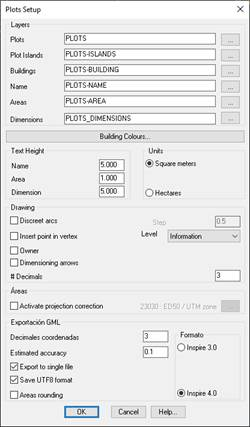
Layers
Plots: The name of the layer on which the parcel will be created.
Plots-Islands: Name of the layer in which the island-type plots will be created.
Plots-Building: Name of the layer in which the building-type plots will be created.
Plots-Name: Name of the layer on which the name of the plot or building will be labeled.
Plots-Area: Name of the layer on which the area of the plot or building will be labeled.
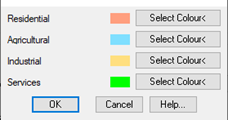
Building Colors: Buildings according to the use assigned to them will be applied a texture with a certain color. In this option we can configure the color of the texture.
Text Height
Name: Text height of the plot name.
Area: Text height of the area of the plot or building.
Dimension: Height of text of the texts associated with the dimensioning of the vertices of the plot.
Units: In the labeling of the area you can work with two units.
1. Square meters
2. Hectares
Drawing
Discretize Arches: When importing or converting a parcel from a polyline, if the plot contains arches, the possibility of discretizing the arches automatically.
Insert Points in the Vertices: If we activate this option, an MDT point will be drawn, at the selected level, for each of the vertices of the plot. This operation is performed automatically when you create the plot.
Area
Num.Decimals: Number of decimals when labeling the areas and coordinates of the vertices of the plot.
Round areas: If this option is activated the area of the plot or building will be calculated assuming that the coordinates of the plot have the number of decimals configured in the previous section.
This option, for export to GML must be activated so that the area that is reflected in the GML file is conincidente with which it is calculated according to the exported coordinates.
Even if it is disabled, when exporting to GML, the command will prompt you to activate it at the time of export.
Activate projection correction: This parameter only affects the parcel listings so that the SRC in which the plot to be printed is reflected in it.
GML Export
Estimated accuracy: In the export to GML files intended for exchange of information with the Cadastre, it is necessary to indicate the estimated precision, this precision will be reflected in the GML file created after export.
Record in UTF8 format: In the creation of the GML file, specify if the file is writter in UTF8 format, it must be activated by default.
Format: When exporting to GML, possibility if you want to export the GML in the Inspire 3.0 or 4.0 format. The default value is 4.0.