Calibration systems can be created in this section which allow the projected coordinates to be transformed into the coordinates of a specific local system.
Subsequently, they can be selected in the active project to work in the local system defined.
Based on the traditional coordinates' transformation methods and in view of their size, a classification has been carried out which includes said methods in addition to a combination of some of them.
3 transformation units are presented:
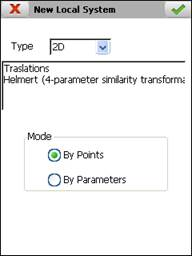
2D : Includes the 4-parameter Helmert transformation and a coordinates translation in x and y.
2D Translations
Calculates the x and y displacements by means of the average of the differences between origin and destination. Only a pair of points is required.
Formulas:
where:
x', y' = Transformed x,y coordinates
x,y = Original x,y coordinates
Tx = Translation x
Ty = Translation y
2D-Helmert
It is also known as the 4-parameter similarity transformation. The transformation process includes 3 steps: scaling, rotation and translations.
The first two are defined by one parameter each and the translations include:
At least two pairs of points are required.
Formulas:
where:
x', y' = Transformed x,y coordinates
x,y = Original x,y coordinates
S = Scale
 = Rotation angle
Tx = Translation x
Ty = Translation y
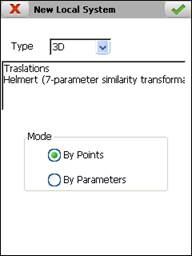
3D : This group is formed by the 7-parameter Helmert transformation and a coordinates translation in x, y and z.
3D Translations
This type of transformation calculates the x, y and z displacements by means of the average of the differences between origin and destination. Only a pair of points is required.
Formulas:
where:
x', y', z' = Transformed x,y,z coordinates
x,y, z = Original x,y,z coordinates
Tx = Translation x
Ty = Translation y
Tz = Translation z
3D-Helmert
It is also known as the transformation of 7 parameters. The parameters involved are: three rotations, three translations and a scale factor. The rotation matrix is constructed by means of three consecutive turns around the alignments x, y, z. At least 3 pairs of points must be available.
Formulas:
where:
x', y', z' = Transformed x,y,z coordinates
x,y, z = Original x,y,z coordinates
S = Scale
Tx, Ty, Tz = Translations in x,y,z
m11...m33 = Rotation matrix coefficients
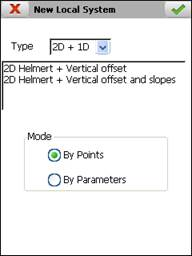
2D + 1D : 3 dimensional transformations which use 2D-Helmert for planimetry and translation in z or translation in z and slopes x and y for altimetry.
2D-Helmert + Vertical Displacement
This type of transformation is a combination of the transformation of 4-parameter Helmert and a displacement in z. This translation is the average of the differences of this component between the points of origin and destination.
Formulas:
where:
x', y' = Transformed x,y coordinates
x,y = Original x,y coordinates
S = Scale
= Rotation angle
Tx = Translation x
Ty = Translation y
Tz = Translation z
2D-Helmert + Vertical Displacement and Slopes
As with the previous transformation, this is a combination of the 4-parameter Helmert transformation and a translation in z calculated in line with a displacement and inclinations of the x and y components. At least two pairs of points are required with x and y coordinates and three with the z component.
Formulas:
where:
x', y' = Transformed x,y coordinates
x,y = Original x,y coordinates
S = Scale
= Rotation angle
Tx = Translation x
Ty = Translation y
Tz = Translation z
Px = Slope x
Py = Slope y
X0 = Original x coordinate of the first pair of points
Y0 = Original y coordinate of the first pair of points
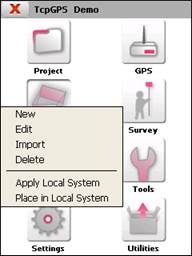
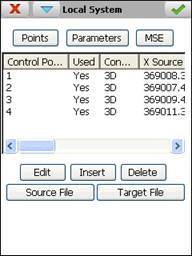
To manage the local systems the following options' menu is presented:
Two modes are distinguished between to define the transformations:
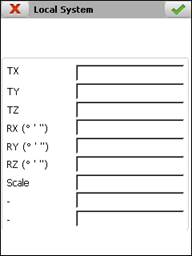
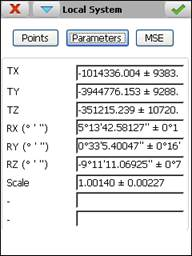
By Parameters : Directly entering the values of the transformation equation parameters. Displacements must be entered in metres and the angle format must be sexagesimal in degrees, minutes and seconds (separated by space) and in an anti-clockwise direction with 0 in the East.
By Points : By entering a series of origin and destination coordinate pairs, 2D or 3D, and calculating the equations' systems of the selected method.
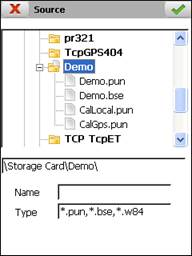
It allows the entering of the pairs of points from a file by means of the Origin File and Destination File buttons or manually by pressing the Insert button.
The files must be of the point (*.PUN) or base (*.BSE) type. For origin data geographic coordinates' files are also permitted with an extension *.W84 created under the option File Management > GPS Data.
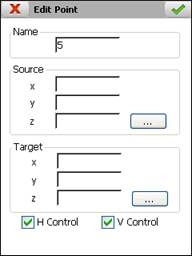
If a point is entered manually the Name, Coordinates Origin and Destination must be indicated and whether it will be used for planimetry, Control H, altimetry, Control V or in both cases. It is also possible to edit the values of these parameters for any point, whatever the insertion method.
The programme endeavours to resolve the selected transformation equations' system every time any change is made to the list of pairs of points, either by inserting, editing or eliminating pairs. If a solution is found, the calculated values will be shown as well as the standard deviation of each parameter. The angle format is sexagesimal in degrees, minutes and seconds and in an anti-clockwise direction with 0 in the East. The displacements are shown in metres.
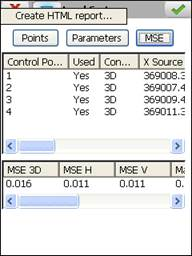
By contrast, if the MSE button is pressed, the screen is accessed which shows the mean square error and the maximum residuals of each x, y, z component. Depending on the size of the transformation, the following square errors are calculated:
2D : Mean square error H (x, y).
3D : Mean square error 3D (x,y,z), H (x, y), V(z).
2D + 1D : Mean square error H (x, y), V(z).
The possibility is also offered of creating a local system report through the option Create HTML Report from the context menu.
An example of this has been shown below:
Transformation Data
|
File
|
D:\Transform\Doc\H2D.htm
|
|
Type
|
Helmert (4-parameter similarity transformation) (2D)
|
|
Date and Time
|
07/04/2012 13:27:33
|
Parameters
|
TX
|
1050003.715 ± 0.123
|
|
TY
|
50542.131 ± 0.123
|
|
Rotation
|
176°46'54.97952'' ± 0°1'58.89222''
|
|
Scale
|
4.51962 ± 0.00058
|
Statistics
|
ECM
|
0.1142
|
|
Standard Deviation
|
0.140
|
|
Max X Residual
|
0.105 (Control Point 3)
|
|
Max Y Residual
|
0.106 (Control Point 3)
|
Control Points
|
Number of Control Points
|
3
|
|
Control Point
|
Used
|
X Origin
|
Y Origin
|
Z Origin
|
X Destination
|
Y Destination
|
Z Destination
|
X Residual
|
Y Residual
|
|
1
|
Yes
|
121.622
|
-128.066
|
50.000
|
1049422.400
|
51089.200
|
30.000
|
0.004
|
-0.029
|
|
2
|
Yes
|
141.228
|
187.718
|
40.000
|
1049413.950
|
49659.300
|
20.000
|
0.101
|
-0.077
|
|
3
|
Yes
|
175.802
|
135.728
|
30.000
|
1049244.950
|
49884.950
|
10.000
|
-0.105
|
0.106
|
Once the parameters have been calculated or entered manually, the accept button must be pressed to create the local system. It is an ASCII file with the extension NTR and with the following format (example of 2D-Helmert transformation):
[Type]
2D Helmert (4-parameter similarity transformation)
[Parameters]
1050003.71454
50542.13112
3.085426889
4.519620520
[Inverse Parameters]
232582.62262
-1876.44668
-3.085426889
0.221257507
[MSE]
3D 0.0000 H 0.1142 V 0.0000
[Inverse MSE]
3D 0.0000 H 0.0253 V 0.0000
[Standard Deviation]
0.140
[Max X Residual]
0.105 (Control Point 3)
[Max Y Residual]
0.106 (Control Point 3)
[Control Points]
3
[Point Used HControl VControl XSource YSource ZSource XTarget YTarget ZTarget XRes YRes ZRes]
1 1 1 1 121.622 -128.066 50.000 1049422.400 51089.200 30.000 0.004 -0.029 ?
2 1 1 1 141.228 187.718 40.000 1049413.950 49659.300 20.000 0.101 -0.077 ?
3 1 1 1 175.802 135.728 30.000 1049244.950 49884.950 10.000 -0.105 0.106 ?
After creating the transformation file, it will be necessary to go to the option Project > Properties and select it from the list Local System. If a different directory has been recorded from that of the current project, a copy must be made to the latter using the option Local System > Import. This option affords the possibility of activating it directly without having to do so in project properties.