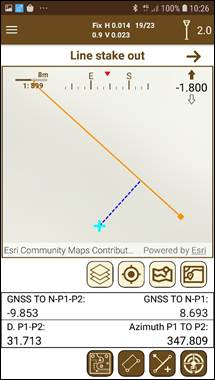
In this template we will work on setting out a line (Figure 91) that will be established between two selected points.
When you want to stake out a line, the application will ask for the first point (selectable in the map) and then for the second. Once the two points are selected, a line will join them on the map and the following information will be presented:
Figure 91. Line stake out
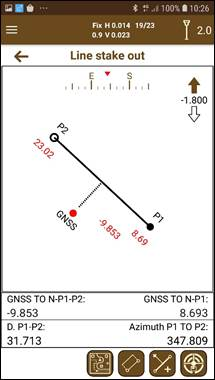
Figure 92. Schematic line stake out
·GNSS TO N-P1-P2: Distance from the current point to the line in perpendicular fashion. If the perpendicular falls outside the line, an extension of it will be drawn for its representation.
·GNSS TO N-P1: Understanding the origin as the first point chosen, this distance is the distance from the current point projected on the line, to the origin.
·D P1-P2 is the length of the line.
·Azimuth P1 TO P2 is the azimuth of the line following the direction P1 to P2.
Line stake out mode displays the line to stake out with the points at both sides and the current position of the user respect to the line.
If the user is out of line ahead (beyond the destination point) or behind (before reaching the point of origin) a dotted line will inform us of this situation.
All the stakeout data is presented on the representation.
If you want to set out another line, just press the button .
Additionally, it is possible to stake out a parallel line to the defined in the map by clicking on the button <imagen>. A dialog will be displayed asking for the distance in meters where the parallel line will be set. If the distance is positive, the new line will be set to the right of the first one, and if it is negative to the left.



 .
.