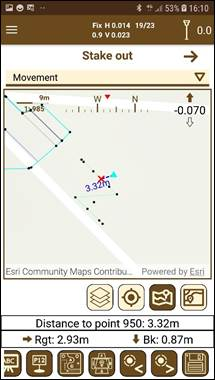
In this mode, a map is displayed showing the available points for setting out and the current position of the GPS. You can select the point to set out simply by clicking on it. A signal indicating the point and a line between the current position and this one will serve to advance towards it in the correct direction. Over this line is shown the distance to the point.
Figure 86. Map staking out mode
The map is always pointing north, unless the reference is set to the movement, which will be pointing to the current direction in which the user is moving. In addition, at the top there is numerical and visual information about the movements to be carried out with the distance that must be travelled.
When a point is stored it is marked with a green symbol as the last set out point, for identifying it in case to be using Setting out to the last point. The other set out points change their symbol to . Once the points are staked out, the user can check the differences between these points and the original points in the section Edit > Points. (Check section Staking out data).