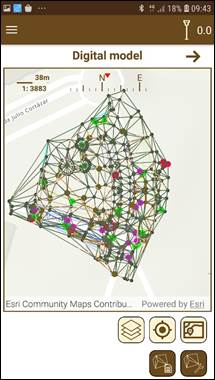
In TcpGPS you can create digital models using the measured or imported points of the project. To access this option, click on the Edit > Digital Model submenu.
When you enter the screen, a map with the points stored in the project and usable for the digital model generation is shown, along with the digital models already created.
Two options are available in this screen:
·Import of a digital model.
·Creation of a digital model.
These models can be used in surface analysis (see Surface analysis section) for getting information about the difference of height between the digital model surface and the current terrain delimited.
Figure 78. Digital model created
The contents of:12 Digital model (Professional version)